Windrock Park
- 2.6
- Rating
- 10.00K
- Installs
- Free
- Price

 Analysis by App-foxy
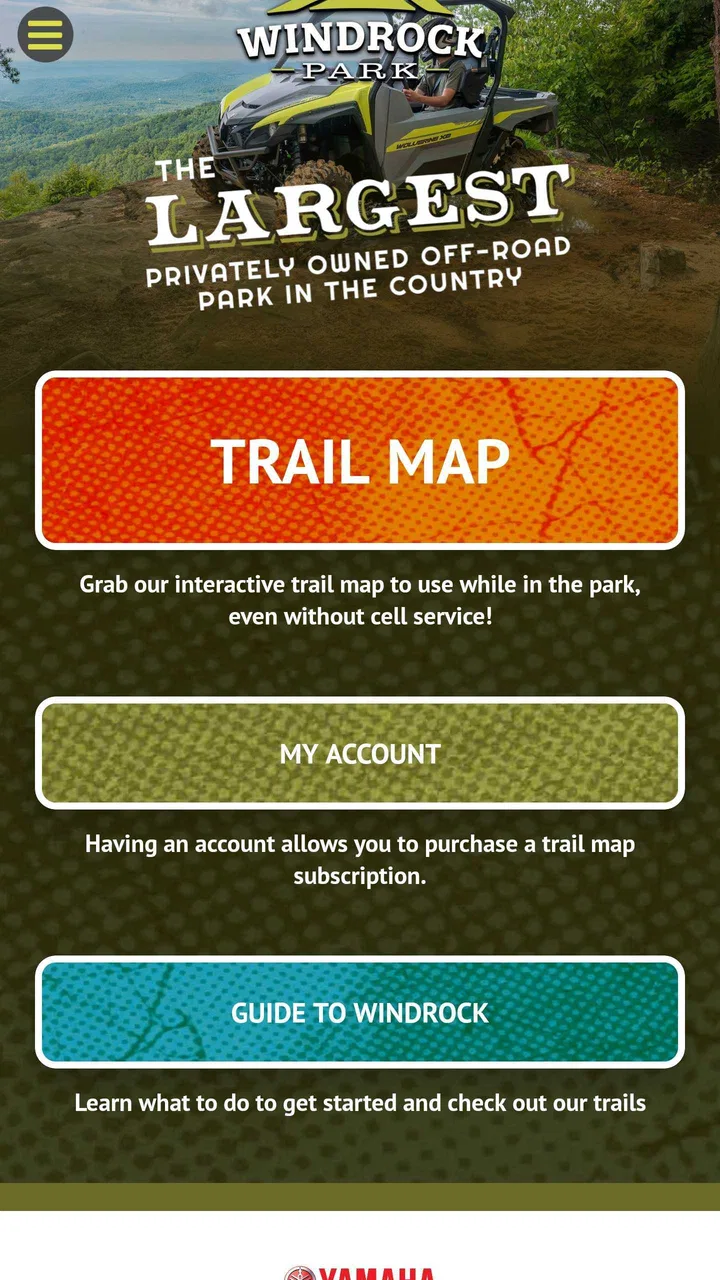
Windrock Park is the kind of travel app I would open before heading toward an off-road day, not something I would keep checking throughout an ordinary city trip. Its focus is narrow and practical: helping visitors connect with Windrock Park as a destination. That specialization is its main appeal, but it also explains why the app will feel much less useful to someone who is simply looking for a broad travel planner, a general map, or a directory of attractions.
After using it, my strongest impression is that the app works best as a destination-specific companion for planning an off-road visit. It gives the park a dedicated place on your phone instead of forcing you to assemble information from unrelated map results, social posts, and browser tabs. That sounds simple, but for a trip where the destination itself is the main event, having one focused reference point can make preparation less scattered.
The app is free to install, is listed for Everyone, and comes from Windrock Properties, LLC. It sits in the Travel & Local category rather than entertainment or navigation, which is a useful clue about how I would approach it: this is a planning and destination app, not a replacement for every tool you may need once you are on the road.
You May Also Like

 AccuWeather: Weather Radar
AccuWeather Review: A Quick, Clear Forecast for Everyday Decisions
For everyday plans, the best forecast is the one you can understand quickly. AccuWeather makes rain timing, radar, and local conditions easy to act on, with a few trade-offs.

 Hill Climb Racing
Why Hill Climb Racing Still Turns Crashes Into One More Run
A tiny car, a bumpy hill and one more upgrade: Hill Climb Racing keeps resurfacing because its simple chaos makes every near-miss feel personal.

 AliExpress - Shopping App
AliExpress Makes Global Shopping Feel Personal, but Shoppers Bear the Risk
AliExpress turns a global marketplace into a pocket-sized discovery engine. Its reach is useful, its shopping loop compelling, and its trade-offs easy to miss.

 Lords Mobile: Kingdom Wars
Lords Mobile Is a Kingdom-Building Routine, Not a Quick Match
A case-by-case verdict on the building, battles, device demands, and social commitments that make Lords Mobile rewarding for some players and exhausting for others.

 PDF Scanner app - TapScanner
TapScanner Makes Paperwork Easier to Capture, Check, and Share
TapScanner makes scanning with a phone feel less like a rescue operation and more like a dependable step in getting work done. Its capture tools are useful, though not flawless.

 Block Blast!
Block Blast! Shows How Much a Puzzle Game Can Leave Out
A quiet grid game shows why puzzle players increasingly value instant clarity, repeatable skill and low-pressure play—and where the genre still needs to catch up.
More From Our News Desk
View All News


Why the park-focused approach matters
The central capability here is concentration. Instead of presenting a huge collection of places, Windrock Park puts attention on one off-road park and the experience around visiting it. In my view, that is more valuable than a generic travel app when I already know where I am going and want to prepare for that particular destination.
A broad map app is excellent for finding fuel, restaurants, hotels, and the fastest route from one town to another. It is not always as helpful for understanding a specialized recreation destination as a whole. Search results can be divided among business listings, map pins, reviews, and unrelated pages. A park-specific app has a better chance of keeping the visit mentally organized: first the destination, then the practical questions that come with spending time there.
That distinction is important because off-road trips are rarely as spontaneous as a quick stop at a museum. People may be bringing a vehicle, equipment, passengers, and a plan for the day. Even when the app does not replace every preparation step, its narrow focus encourages me to think about the park before I arrive rather than treating it like an ordinary point on a map.
I also like that the app does not pretend to be a universal travel solution. Its store summary presents Windrock Park as an off-road destination, and the short description is simply the park’s name. That restrained positioning matches my experience of its role: it is most useful when the park is already the reason for the journey.
What I would use it for before leaving
My preferred workflow is to open the app while the trip is still flexible. I would use it to get familiar with the destination, then switch to a regular map application for the drive itself and use other sources for broader arrangements such as lodging or fuel. This division of labor is more realistic than expecting one app to handle everything.
There is a practical advantage to doing this early. If I wait until I am already driving, I am more likely to overlook small but important decisions: how much time to allow, what the group expects from the visit, and which information needs to be checked before leaving a reliable connection. A focused park app is better used as a pre-trip reference than as something I discover at the last minute.
One useful habit is to review the app with the whole group before the trip. An experienced off-road driver may already know what they want, while a passenger or first-time visitor may need a clearer sense of what the destination involves. Looking at the same park-focused information together can prevent mismatched expectations, especially when one person imagines a casual sightseeing outing and another is planning a full day around off-road activity.
I would also keep a separate written or offline note for anything I consider essential. That is not a criticism unique to this app; it is sensible preparation for any destination tool. A phone can lose signal, a battery can run down, and a travel app should not be the only place where a group keeps its key plans.
A realistic day-trip example
Imagine I am arranging a Saturday outing with two friends. One person has experience with off-road driving, another is curious but unfamiliar with the setting, and I am responsible for keeping the day organized. I would start with Windrock Park to create a shared picture of the destination. Then I would check the driving route separately, identify a suitable fuel stop, confirm the vehicle is ready, and make sure everyone understands that this is a park-centered day rather than a general sightseeing tour.
On the morning of the trip, I would open the app before setting off, not while moving. I would use it as a final reminder of the destination and any planning details I had gathered, then rely on a conventional navigation app for turn-by-turn driving. At the park, I would avoid assuming that a destination app automatically provides live guidance for every decision. Instead, I would keep the group together, follow posted instructions, and treat the app as supporting material.
The payoff is not dramatic automation. It is reduced mental clutter. Rather than searching the park name repeatedly across several services, I have one dedicated app to revisit when discussing the visit. That is a modest benefit, but it is exactly the kind of benefit that can make a specialized travel tool worthwhile.
Where it fits beside ordinary alternatives
Compared with Google Maps or Apple Maps, this app is more focused on the destination and less suited to general navigation. Those mainstream map tools remain the better choice for route planning, traffic, nearby businesses, and finding services along the way. I would not replace them with Windrock Park for a long drive.
Compared with a browser search, the app can feel more intentional. Searching the web may produce a wider range of current discussions, visitor comments, and third-party suggestions, but it can also leave me sorting through information that has little to do with my actual visit. The app’s value is the opposite: less breadth, more destination focus.
Compared with social media groups, it is likely to be less conversational. Community discussions can be useful for personal experiences and changing conditions, but they can also be inconsistent and difficult to browse. I would use those communities for another perspective, not as a substitute for the app’s direct park orientation.
Compared with a paper guide or saved browser page, the app is easier to reopen and carry as part of my phone-based travel kit. The trade-off is that it depends on the app continuing to work well on the device and on me keeping my phone charged. For a prepared visitor, the strongest setup is not choosing one tool; it is using each tool for what it does best.
The friction I noticed in everyday use
The rating is a useful warning sign. Windrock Park has an average rating of 2.6 from over one hundred ratings, with around eighty written reviews. I would not treat that number as a complete verdict, because ratings can reflect different expectations and different versions of an app, but I would take it seriously before making the app my only source of trip information.
That score tells me to test the app before travel rather than assuming it will become indispensable immediately. I would install it at home, open the sections I expect to use, and see whether the experience feels clear on my phone. If it handles my planning needs comfortably, the narrow focus may be enough. If I find myself constantly leaving it to answer basic questions, I would keep it as a supplementary reference instead of depending on it.
Another limitation is the tension between specialization and completeness. A park app can be more relevant than a general travel app while still not covering every part of a real trip. I may need separate tools for driving directions, weather, accommodation, fuel, communication, and personal safety. That is not a reason to dismiss it, but it does mean I would judge it by whether it improves park-specific preparation, not by whether it replaces my entire travel setup.
The app also includes in-app purchases priced from $9.99 to $19.99 per item. Since the base app is free, I would be careful about treating the free installation as the complete value proposition. Before paying for anything, I would first decide whether the additional content directly solves a problem for my particular visit. Someone making one casual visit may reasonably prefer to stay with the free experience, while a committed park visitor may see more value in optional additions if they clearly support repeated use.
I appreciate having that choice, but it creates a decision point that should not be rushed. A purchase is more defensible when I already understand how often I will visit and what information I actually need. Paying simply because an item appears available is not a good travel-planning strategy.
Compatibility and preparation before the trip
The current version is 2.0.3, and the app requires Android 7.0 or later. That makes checking the phone’s software worthwhile before relying on it. If I were organizing a group trip, I would not assume every participant can install it without checking their device first, especially if someone is using an older Android phone.
I would also install and test it while connected to dependable Wi-Fi. That gives me time to understand the layout, notice whether I need any optional content, and decide what information should be saved elsewhere. Testing at home is particularly important for a destination app because the moment I need it most may be during travel, when troubleshooting is inconvenient.
For iPhone users, I would confirm the current availability and compatibility in the relevant Apple storefront before planning around it. The important point is simple: no one should make the app their sole trip resource until it has been opened successfully on the exact device they intend to carry.
Who gets the most from this app
The best audience is someone who already has Windrock Park in mind and wants a dedicated digital companion for the visit. That includes people planning an off-road day, groups coordinating a destination-focused outing, and returning visitors who prefer to keep park information in one place instead of beginning from a blank web search each time.
It may also help a first-time visitor who feels unsure where to begin. The app’s specialization gives the planning process a clear starting point. I would still encourage a newcomer to combine it with ordinary navigation, practical vehicle preparation, and current checks before departure, but the park-centered approach can make the destination feel less abstract.
On the other hand, I would skip it if my trip has nothing to do with Windrock Park, if I only need road navigation, or if I want a broad catalog of attractions across an entire region. In those cases, a standard map or travel-planning app will be more efficient. I would also hesitate to recommend depending on it alone to someone who dislikes using several travel tools together.
My recommendation after weighing the trade-offs
Windrock Park is a specialized Travel & Local app with a clear purpose, and that purpose is both its strength and its boundary. I like the idea of having a destination-specific reference when planning an off-road visit, particularly because it encourages preparation before the vehicle is on the road. The free entry point makes it reasonable to test without committing immediately.
Still, the modest rating means I would approach it with practical expectations. I would test version 2.0.3 at home, keep a conventional map app available, and avoid assuming that optional purchases are necessary until I understand their value. I would also keep essential plans accessible outside the app and check the phone requirement before traveling.
My final view is that this is worth trying for a Windrock Park visitor, but not as a universal travel solution. Its real value is focus, not completeness. If that focus matches your trip, it can give your preparation a useful center. If you need live driving help, broad local discovery, or one app for every travel detail, I would choose the usual alternatives and treat this one as optional support.
For the right user, that is enough. A free, park-specific app does not need to replace every service on a phone to be useful; it only needs to make planning this particular destination clearer and less scattered. In my experience, Windrock Park has a fair chance of doing that, provided I use it alongside—not instead of—the other tools a real off-road day requires.
FAQs for Windrock Park
01What is Windrock Park, and what can visitors do there?
Windrock Park is a large outdoor recreation destination in Oliver Springs, Tennessee, known for off-road adventures and scenic mountain landscapes. Visitors can explore trails with ATVs, UTVs, dirt bikes, and four-wheel-drive vehicles, depending on the area and current rules. The park also hosts events and may offer camping or lodging options, making it suitable for day trips and longer outdoor stays.
02Can I use the Windrock Park app without visiting the park?
The app can be useful before and during a visit, but many of its most practical features are designed for people planning to explore Windrock Park in person. You may be able to review park information, trail details, maps, updates, or event-related content before arriving. However, available features can change, and the app should not be considered a replacement for checking official park rules and conditions.
03Does Windrock Park provide trail maps and navigation tools?
Windrock Park is known for its extensive trail system, so maps and navigation information are among the most important resources for visitors. Depending on the app version and available data, users may find trail locations, difficulty information, points of interest, or route guidance. It is still wise to download or save important information in advance because mobile coverage can be inconsistent in mountainous and wooded areas.
04What should I know about park rules, vehicle requirements, and safety?
Before downloading the app or planning a visit, users should review Windrock Park’s current rules, operating hours, fees, vehicle requirements, and safety guidance. Off-road trails can include steep climbs, rocks, mud, water crossings, and changing weather conditions. Drivers should use suitable, well-maintained equipment, carry recovery and emergency supplies, follow marked routes, and never assume that a trail is appropriate for every vehicle or experience level.
05Is the Windrock Park app free, and is it available for Android and iPhone?
The Windrock Park app’s price and platform availability may depend on the current release, region, and publisher. Many park companion apps can be downloaded at no cost, although certain activities, reservations, passes, events, or in-park services may require separate payment. Check the Google Play Store or Apple App Store listing before installing to confirm compatibility, recent updates, permissions, and whether any optional purchases are included.
Pros
- Extensive trail network suits beginners
- families
- and experienced riders.
- Detailed park maps make it easier to plan routes before heading out.
- Scenic mountain views add plenty of appeal beyond the off-road action.
- Camping options allow visitors to turn a day trip into a weekend stay.
- Regular events and guided activities create extra reasons to visit.
Cons
- Some trails may be too challenging without proper off-road experience.
- Weather can quickly affect trail conditions and park accessibility.
- Admission
- camping
- and rental costs can add up for larger groups.
- Cell service may be limited in remote areas of the park.
- A suitable vehicle or equipment is often needed to enjoy the main attractions.

Windrock Park
Gallery